We recommend using the current Serverless Cloud API, which is faster.
Refer to the Serverless Cloud API documentation to get started with the new API.
Model Support
Newer model architectures (such as Florence-2, SAM 3, and others) are only available on the current Serverless Cloud API. Legacy workspaces that have not migrated to a credit-based plan will receive a 402 error when attempting to use these models. Upgrade your plan to access the full set of supported models via the Serverless Cloud API.
The following models types are supported by the Hosted API (Legacy):
| Task Type | Supported by Hosted API (Legacy) |
|---|---|
| Object Detection | ✅ |
| Classification | ✅ |
| Instance Segmentation | ✅ |
| Semantic Segmentation | ✅ |
| Keypoint Detection | ✅ |
Latency comparison
The end-to-end latency of requests sent to the Hosted API (Legacy) depends on several factors:
- Model architecture, which has a bearing on the execution time
- Size and resolution of the images that impact upload time and model inference time during execution
- Network latency and bandwidth, which affects request upload time and response download time.
- Service subscription and usage by other users at any specific time which could result in queueing latency
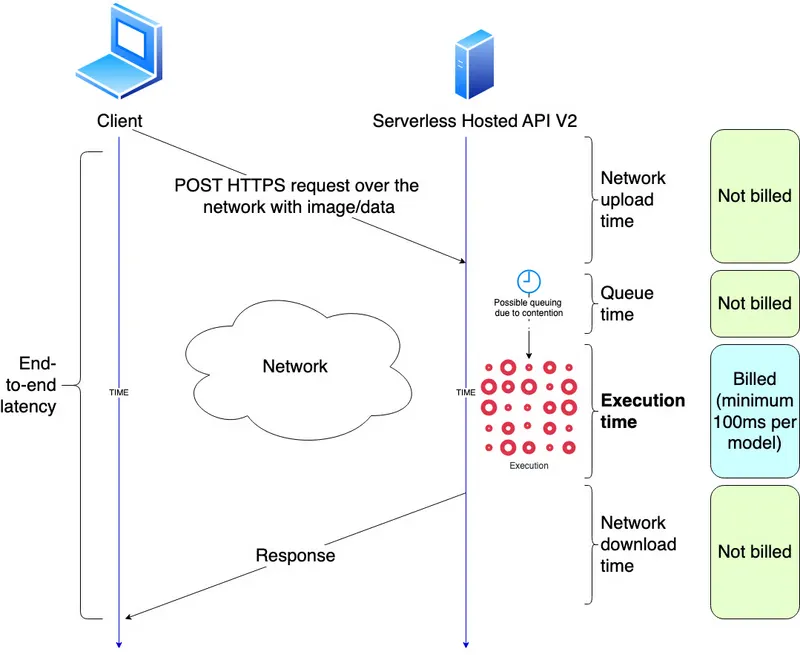
We show some representative benchmarks of the Hosted API (Legacy) against the Serverless Cloud API in the table below. It shows both the end-to-end latency (E2E) as well as the execution time (Exec). These numbers are for information only, we encourage users to perform their own benchmarks using our inference benchmark tools or their own custom benchmarks.
| Model | V2 (E2E) | V2 (Exec) | V1 (E2E) | V1 (Exec) |
|---|---|---|---|---|
| yolov8x-640 | 401 ms | 29 ms | 4084 ms | 821 ms |
| yolov8m-640 | 757 ms | 21 ms | 572 ms | 265 ms |
| yolov8n-640 | 384 ms | 17 ms | 312 ms | 63 ms |
| yolov8x-1280 | 483 ms | 97 ms | 6431 ms | 3032 ms |
| yolov8m-1280 | 416 ms | 52 ms | 1841 ms | 1006 ms |
| yolov8n-1280 | 428 ms | 35 ms | 464 ms | 157 ms |
We encourage users to run their own benchmarks for their model inferences and workflows to get real metrics on their specific usecases.
Limits
The Hosted API (Legacy), regardless of the specific task type, accepts files up to 5MB. This limit includes, but is not limited to, the image file size plus any request information attached.
In the cases that requests are too large, we recommend downsizing any attached images. This usually will not result in poor performance as images are downsized regardless after they've been received on our servers to the input size that the model architecture accepts.
Some of our SDKs, like the Python SDK, automatically downsize images to the model architecture's input size before they are sent to the API.