You can build applications that authenticate users with their Roboflow account using the OAuth 2.1 authorization code flow with PKCE. This lets your app act on behalf of a Roboflow user, scoped to only the permissions they approve.
OAuth access tokens work on api.roboflow.com with Authorization: Bearer. See Authenticate with the REST API for details.
For endpoint tables, visibility, errors, and a runnable sample app, see Sign In With Roboflow (Developer Reference).
Create an OAuth App
To register your application:
Open Developer Settings
Go to Workspace Settings > Developer in your Roboflow dashboard at app.roboflow.com.

Create a new OAuth app
Click Create OAuth App (or New app) and fill in:
| Field | Description |
|---|---|
| Name | Display name on the consent screen and in your OAuth apps list |
| Homepage URL | Your product URL (shown on consent; informational) |
| Redirect URIs | One or more callback URLs (must match your code exactly) |
| Token endpoint authentication | How the client sends its secret to the token endpoint: client_secret_post (secret in the request body, default) or client_secret_basic (secret in the HTTP Basic Authorization header). Most MCP gateways (Azure, TrueFoundry) use client_secret_basic. |
| Allowed scopes | Every scope you will request at sign-in |
| Visibility | Internal, Unlisted, or Public - see Developer Reference - Visibility |
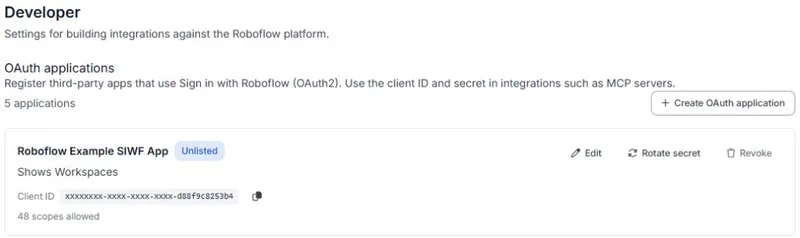
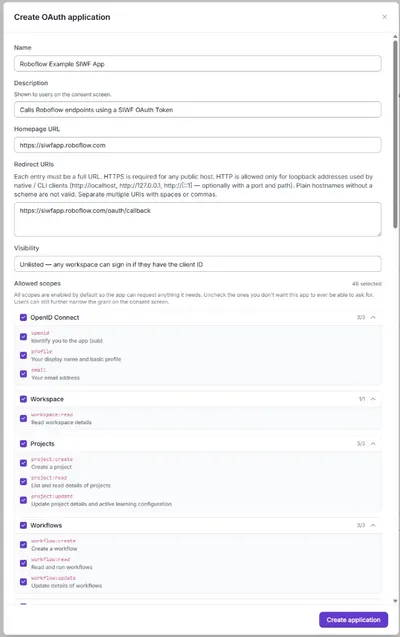
You will receive a Client ID and Client Secret (rfcs_…). The secret is shown only once, so store it securely on your server.
Redirect URI examples
| Redirect URI | Typical use |
|---|---|
http://localhost:3001/oauth/callback | Local dev on port 3001 |
http://127.0.0.1:3001/oauth/callback | Same as above if your app uses 127.0.0.1 |
https://yourapp.com/oauth/callback | Production |
HTTPS is required for public hosts. HTTP is allowed only for loopback (localhost, 127.0.0.1, ::1).
Authorization Flow
Roboflow uses the authorization code grant with PKCE (Proof Key for Code Exchange). PKCE is required for all clients.
Generate a PKCE code verifier and challenge
Create a random code_verifier (43–128 characters) and derive a code_challenge from it using SHA-256:
import hashlib, base64, secrets

code_verifier = secrets.token_urlsafe(32)
code_challenge = base64.urlsafe_b64encode(
    hashlib.sha256(code_verifier.encode()).digest()
).rstrip(b"=").decode()Redirect the user to authorize
Send the user to the Roboflow authorization endpoint:
https://app.roboflow.com/oauth/authorize?
  client_id=YOUR_CLIENT_ID&
  redirect_uri=https://yourapp.com/callback&
  response_type=code&
  scope=openid profile email workspace:read&
  code_challenge=YOUR_CODE_CHALLENGE&
  code_challenge_method=S256&
  state=YOUR_STATE_VALUE
Use a cryptographically random state and verify it on callback. Store code_verifier server-side until you exchange the code.
The user sees a consent screen with the permissions your app requested.
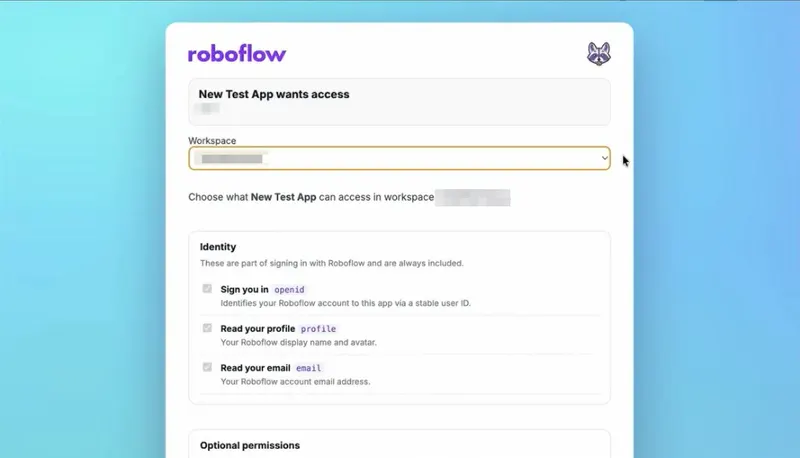
After they approve, Roboflow redirects to your redirect_uri with code and state.
Exchange the code for tokens
On your server (never in the browser), POST to the token endpoint:
curl -X POST https://app.roboflow.com/oauth/token \
  -H "Content-Type: application/x-www-form-urlencoded" \
  -d "grant_type=authorization_code" \
  -d "client_id=YOUR_CLIENT_ID" \
  -d "client_secret=YOUR_CLIENT_SECRET" \
  -d "code=AUTHORIZATION_CODE" \
  -d "redirect_uri=https://yourapp.com/callback" \
  -d "code_verifier=YOUR_CODE_VERIFIER"
The response includes:
access_token- call Roboflow APIs (valid for 1 hour, or 24 hours for MCP clients)refresh_token- get new access tokens (valid for 30 days)id_token- JWT with identity claims (whenopenidis requested)
Using OAuth Tokens
Once you have an access token, send it in the Authorization header:
curl -H "Authorization: Bearer rfoa_..." https://api.roboflow.com/Validate a Token
If you hold an opaque rfoa_ access token and need to check its status or expiry without client credentials, call the validate endpoint:
curl -H "Authorization: Bearer rfoa_..." https://app.roboflow.com/oauth/validateResponse (always HTTP 200):
{
  "active": true,
  "exp": 1893456000,
  "workspace_url": "your-workspace",
  "scopes": ["workspace:read", "project:read"]
}
An expired or revoked token returns { "active": false, "exp": null, ... } instead of an HTTP error, so callers can distinguish a dead token from an unreachable auth server.
Refresh a Token
Access tokens expire after 1 hour (24 hours for MCP clients). Use the refresh token to get a new one:
curl -X POST https://app.roboflow.com/oauth/token \
  -H "Content-Type: application/x-www-form-urlencoded" \
  -d "grant_type=refresh_token" \
  -d "client_id=YOUR_CLIENT_ID" \
  -d "client_secret=YOUR_CLIENT_SECRET" \
  -d "refresh_token=YOUR_REFRESH_TOKEN"
Revoke a Token
To revoke an access or refresh token:
curl -X POST https://app.roboflow.com/oauth/revoke \
  -H "Content-Type: application/x-www-form-urlencoded" \
  -d "token=TOKEN_TO_REVOKE"
User Info
Retrieve profile information for the authenticated user (requires openid):
curl -H "Authorization: Bearer rfoa_..." https://app.roboflow.com/oauth/userinfoAvailable Scopes
Your app can request any combination of the following scopes. Each scope must also be enabled on your OAuth app's Allowed scopes list.
Identity Scopes
| Scope | Description |
|---|---|
openid | Required. Returns a stable user ID in the sub claim. |
profile | Read the user's display name and avatar. |
email | Read the user's email address. |
API Scopes
| Scope | Description |
|---|---|
workspace:read | Read workspace details, list projects |
project:create | Create projects |
project:read | Read project details |
project:update | Update project settings |
image:create | Upload images |
image:read | Read and download images |
image:tag | Add and remove image tags |
image:annotate | Create and update annotations |
model:infer | Run inference |
model:deploy | Deploy models |
model:manage | Manage model settings |
model-eval:read | Read model evaluation results |
workflow:create | Create Workflows |
workflow:read | Read Workflows |
workflow:update | Update Workflows |
version:create | Create dataset versions |
version:read | Read dataset versions |
version:update | Update dataset versions |
training-job:create | Start training jobs |
folder:create | Create project folders |
folder:read | Read project folders |
folder:update | Update project folders |
folder:delete | Delete project folders |
Additional scopes
| Scope | Description |
|---|---|
device:read | Read devices |
device:update | Update device settings |
vision-events:read | Read vision events |
vision-events:write | Create vision events |
vision-events:manage | Manage vision event use cases |
annotation-job:create | Create annotation jobs |
annotation-job:read | Read annotation jobs |
video-inference-job:create | Create video inference jobs |
video-inference-job:read | Read video inference jobs |
integration:create | Create integrations |
integration:delete | Delete integrations |
credentials:create | Create credentials |
credentials:read | Read credentials |
credentials:update | Update credentials |
credentials:delete | Delete credentials |
data-staging:read | Read staged data |
data-staging:write | Write staged data |
data-staging:delete | Delete staged data |
batch-processing:read | Read batch jobs |
batch-processing:trigger | Trigger batch processing |
batch:read | Read batches |
workspace-stats:read | Read workspace statistics |
OIDC Discovery
Roboflow publishes standard OpenID Connect discovery documents:
- OpenID Configuration:
https://app.roboflow.com/.well-known/openid-configuration - JWKS (for verifying ID tokens):
https://app.roboflow.com/.well-known/jwks.json
Next steps
- Sign In With Roboflow (Developer Reference) - hosts, visibility, errors, example app
- Authenticate with the REST API