The License Server is deprecated. New deployments should use Secure Gateway, its successor, which adds local caching of model weights and container images.
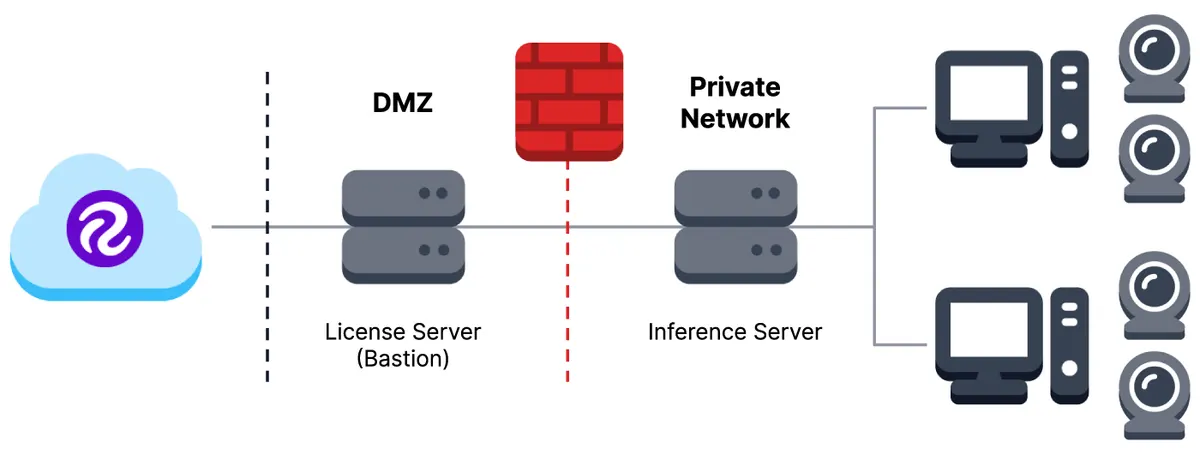
Prerequisites
- Linux server running Ubuntu 20.04+ or Debian 11+
- Internet access to api.roboflow.com and repo.roboflow.com
- Static IP address or hostname
- Port 80 available (or custom port)
- Docker Engine 20.10+
- 200GB+ storage
- 4GB+ memory
Using the License Server
If you wish to firewall the Roboflow Inference Server from the Internet, you will need to use the Roboflow License Server which acts as a proxy for the Roboflow API and your models' weights.
On a machine with access to https://api.roboflow.com and https://repo.roboflow.com (and port 80 open to the Inference Server running in your private network), pull the License Server Docker container:
docker pull repo.roboflow.com/roboflow/license-serverAnd run it:
docker run -d --name license-server -p 80:80 --restart unless-stopped \
    repo.roboflow.com/roboflow/license-server:latest
Configure your Inference Server to use this License Server by passing its IP in the LICENSE_SERVER environment variable:
sudo docker run --net=host --env LICENSE_SERVER=10.0.1.1 roboflow/inference-server:cpuConfiguring via Deployment Manager
If you manage your devices through Deployment Manager, you can set the License Server address directly in the Configuration tab for each device's inference service.
When you enter a License Server address, API_BASE_URL is automatically set to https://api.roboflow.com. This gives the License Server an upstream to proxy requests to, and prevents a misconfiguration where both LICENSE_SERVER and API_BASE_URL point to the same on-prem address (which would cause a recursive proxy loop).
Clearing the License Server field does not remove API_BASE_URL, so existing configurations are not disrupted.