About
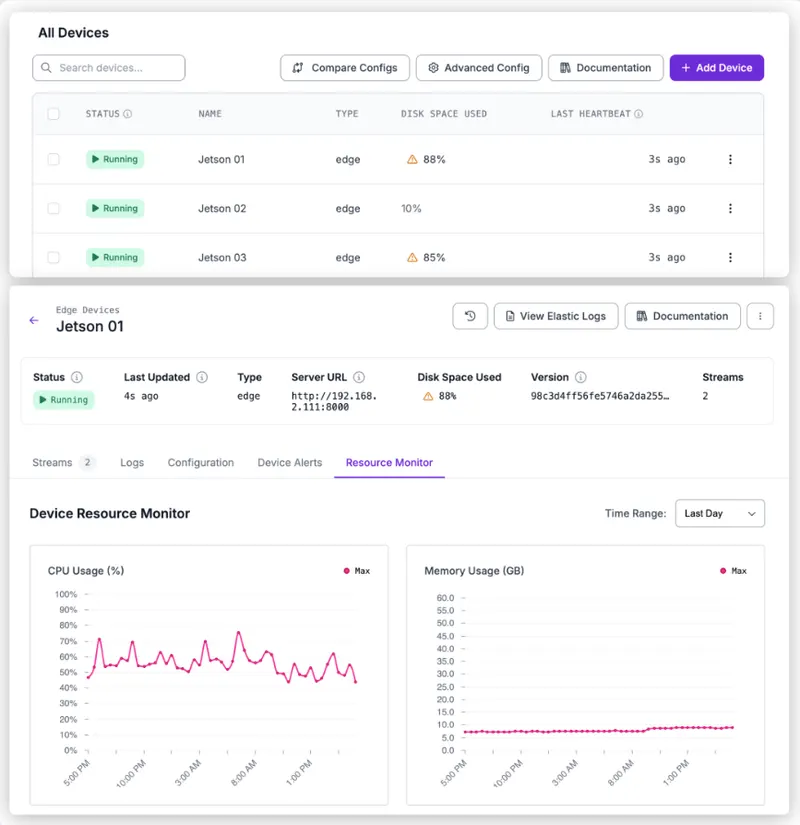
Roboflow Deployment Manager lets you easily set up, deploy, and manage computer vision models on edge devices. After training your model and building a workflow, it provides an all-in-one solution for scaling deployments.
You can use Deployment Manager to:
- Set up new devices with the Roboflow Inference server.
- Configure camera streams for use in a deployment.
- Deploy Workflows on the edge.
- Monitor logs, stream status, and telemetry for deployed edge devices.
Deployment Manager is available exclusively for Enterprise customers. Contact the Roboflow sales team to learn more about this feature and how it can be used to manage your deployments at scale.
Key Requirements:
Deployment Manager is built for Roboflow-supported hardware:
- Supported: Hardware purchased via Roboflow
- Unsupported (use at your own risk): NVIDIA Jetson, x86 machines running Debian-based Linux with NVIDIA GPUs
- Not yet supported: Mac or Windows-based systems
Devices must be connected to the internet for setup and ongoing operation, with continuous access to Roboflow for remote management and monitoring.
Edge Services
Alongside the inference server, a device can run additional Roboflow Services. Add and configure them from the device's Configuration tab, described in Update Device Configuration.
- Event Store stores inference events on the device, with automatic retention and optional cloud backup.
- OPC UA Server publishes data as OPC UA tags for PLCs and SCADA systems.
- PLC Relay reads and writes PLC tags over Allen-Bradley, Modbus TCP, or Siemens S7.
- RTSP Simulator streams an uploaded video file as an RTSP source for testing.
Each service serves its own HTTP API on the device's address. See Services for the base URL, authentication, and error-shape rules they share.
Guides
Setting Up
Follow the Setting Up guides in order to get a device online and running Workflows.
| Guide | Description |
|---|---|
| Hardware Requirements | Supported hardware, cameras, network, and outbound traffic requirements. |
| Add a Device | Provision a new edge device and register it with your account. |
| Add a Stream | Configure a camera stream that runs a Workflow. |
| Set up Device Alerts | Enable email alerts for connectivity, disk, and FPS issues. |
| Setup Maintenance Windows | Schedule when deploy-affecting changes take effect. |
Making Changes
The Making Changes guides cover updating, reconfiguring, and removing devices and streams after setup.
| Guide | Description |
|---|---|
| Update Device Configuration | Manage device settings, service versions, and additional services. |
| Configure Device Network | Set IP addressing, gateway, DNS, and hostname from the cloud. |
| Configure AI1 Camera Settings | Tune exposure, gain, focus, and other AI1 camera settings live. |
| Set a Static IP for a Camera | Assign a persistent static IP to a GigE Basler or Lucid camera. |
| Soft Reset a PoE Port | Power-cycle a PoE port to recover stuck camera links. |
| Pause and Resume a Stream | Temporarily pause a running stream and resume it later. |
| Trigger a Stream | Run a Workflow on demand against a Triggered stream. |
| Terminate a Stream | Permanently remove a stream and its configuration. |
| Redeploy Deployment Manager | Recover a device's configuration after a failure. |
| Delete a Device | Permanently remove a device you no longer use. |
| API Keys for Deployment Manager | How device API keys are generated, scoped, and revoked. |
Monitoring
The Monitoring guides show how to check stream status, logs, resources, and Event Store health.
| Guide | Description |
|---|---|
| View a Stream | View a stream's status, latest frame, and Workflow details. |
| View Device Logs | Search, filter, and download logs from Roboflow services. |
| View the Resource Monitor | Monitor disk, memory, CPU, GPU, and service container health. |
| View Event Store Status | Monitor Event Store usage, backup progress, and history. |
HTTP API
The Deployment Manager API lets you monitor and manage your Roboflow Deployment Manager (RFDM) devices programmatically.
All endpoints are mounted under /:workspace/devices/v2 on the public API host (https://api.roboflow.com). Read endpoints require a scoped API key with the device:read scope; endpoints that change a device require device:update. Workspace API keys with no explicit scopes list are implicitly granted all scopes (legacy behavior); keys that carry an explicit scopes array must include the relevant scope.
With the Deployment Manager API, you can:
- List and Get Devices
- Create a Device
- Device Config
- Device Commands
- Device Streams
- Device Logs and Telemetry
- Device Events
The optional edge services (Event Store, PLC Relay, RTSP Simulator, OPC UA Server) serve their own HTTP APIs on the device's address rather than through api.roboflow.com. They do not accept a Roboflow API key, and their authentication and error shapes differ from everything below. See Services.
Authentication
All endpoints accept a workspace API key via either:
- Query string:
?api_key=YOUR_API_KEY - Header:
Authorization: Bearer YOUR_API_KEY
Device-scoped API keys
API keys minted for a specific device (for example, by RFDM during install) are narrowed to that device. They may only call routes whose :deviceId path parameter equals the key's bound device. They will receive 403 on the workspace-wide list and create endpoints, and on any :deviceId path that doesn't match.
Cross-workspace isolation
A workspace API key can only read or modify devices that belong to its workspace. Requests for a device id owned by a different workspace return 404, even if the id is otherwise valid.
Errors
| Status | Meaning |
|---|---|
| 400 | Invalid query parameter (unknown time_period, malformed cursor or date, invalid direction, etc.) or invalid request body. |
| 401 | Missing or invalid API key. |
| 403 | Device-scoped API key targeting a different device, the workspace-wide list/create routes, a source device from another workspace during duplication, or a feature-gated request rejected (for example, AI1 creation or offline_mode not enabled for the workspace). |
| 404 | Device, stream, config, or source device not found. Read requests for device ids owned by another workspace also return 404. |
| 429 | Rate limit exceeded. Logs are limited to 5 requests per minute per IP and 50 per minute globally; telemetry reads are limited to 60 requests per minute per device with a 10-request burst over 10 seconds. |
Error responses use one of two shapes:
- Handler-level errors (typically 400, 403, 404, and 429 from the handlers themselves) return
{ "error": "<message>" }. - Authentication and workspace-validation failures (typically 401) return a structured
errorobject:{ "error": { "message": "...", "status": 401, "type": "OAuthException", "hint": "..." } }.
The logs rate limiter additionally returns a plain string body (not JSON) when it triggers a 429.
List and Get Devices
List Devices
List every device registered in the workspace. Device-scoped API keys cannot call this endpoint and receive 403.
Required scope: device:read
List Devices
List every device registered in the workspace. Device-scoped API keys cannot call this endpoint and receive 403.
Roboflow API key passed as a Bearer token.
Roboflow API key passed as the api_key query string parameter.
Workspace ID (URL slug).
200Devices in the workspace.application/json
Show propertiesHide properties
online if a heartbeat was received within the last 5 minutes, offline if older, unknown if no heartbeat has ever been recorded.
onlineofflineunknownVersion of the Roboflow Device Manager running on the device.
Device type reported by the device (for example "jetson").
Show propertiesHide properties
Total system memory in MB. May be null when not reported.
Raw total disk capacity reported by the device. Despite the _mb suffix, RFDM-reported devices currently return this value in bytes. Treat the unit as device-defined.
401Missing or invalid API key.application/json
Show propertiesHide properties
Show propertiesHide properties
403API key is bound to a different device, or this endpoint is not permitted for device-scoped keys, a source device belongs to another workspace, or a feature gate (for example AI1 creation, roboflowLiteMode) blocks the request. application/json
Show propertiesHide properties
Show propertiesHide properties
Example Request
curl "https://api.roboflow.com/{workspace}/devices/v2?api_key=$ROBOFLOW_API_KEY"Example Response
{
  "data": [
    {
      "id": "abc123",
      "name": "factory-floor-cam-1",
      "status": "online",
      "last_heartbeat": "2026-04-28T12:00:00.000Z",
      "platform": "Linux",
      "platform_release": "5.10.104-tegra",
      "platform_version": "#1 SMP PREEMPT ...",
      "architecture": "aarch64",
      "hostname": "jetson-01",
      "rfdm_version": "1.2.3",
      "type": "jetson",
      "hardware": {
        "processor": "aarch64",
        "gpu": null,
        "total_memory_mb": null,
        "total_disk_space_mb": 124426534912
      },
      "tags": ["production", "line-3"],
      "created_at": "2026-01-15T08:30:00.000Z"
    }
  ]
}
The status field is online if a heartbeat was received within the last 5 minutes, offline if older, or unknown if no heartbeat has ever been recorded. Newly-provisioned devices appear in the list before their first heartbeat; until then status is unknown and most monitoring-derived fields are null.
hardware.total_disk_space_mb is a raw value reported by the device. Despite the _mb suffix, RFDM-reported devices currently return this value in bytes (for example 124426534912 for a ~124 GB disk). Treat the unit as device-defined.
Get Device
Retrieve a single device by id. Returns 404 if the device does not exist or belongs to a different workspace.
Required scope: device:read
Get a Device
Retrieve a single device by ID.
Roboflow API key passed as a Bearer token.
Roboflow API key passed as the api_key query string parameter.
Workspace ID (URL slug).
Device ID.
200The device.application/json
online if a heartbeat was received within the last 5 minutes, offline if older, unknown if no heartbeat has ever been recorded.
onlineofflineunknownVersion of the Roboflow Device Manager running on the device.
Device type reported by the device (for example "jetson").
Show propertiesHide properties
Total system memory in MB. May be null when not reported.
Raw total disk capacity reported by the device. Despite the _mb suffix, RFDM-reported devices currently return this value in bytes. Treat the unit as device-defined.
401Missing or invalid API key.application/json
Show propertiesHide properties
Show propertiesHide properties
403API key is bound to a different device, or this endpoint is not permitted for device-scoped keys, a source device belongs to another workspace, or a feature gate (for example AI1 creation, roboflowLiteMode) blocks the request. application/json
Show propertiesHide properties
Show propertiesHide properties
404Device, stream, configuration, or source device not found. Read requests for devices owned by another workspace also return 404. application/json
Show propertiesHide properties
Show propertiesHide properties
Example Request
curl "https://api.roboflow.com/{workspace}/devices/v2/{deviceId}?api_key=$ROBOFLOW_API_KEY"The response body matches a single item from the list endpoint (not wrapped in a data array).
Create a Device
Create a new device in your workspace and return the identifiers needed to install it. Device-scoped API keys cannot call this endpoint and receive 403.
Required scope: device:update
Create a Device
Create a new device in the workspace and return the identifiers needed to install it. Device-scoped API keys cannot call this endpoint and receive 403. Requires the device:update scope.
Roboflow API key passed as a Bearer token.
Roboflow API key passed as the api_key query string parameter.
Workspace ID (URL slug).
Human-readable name for the device. For AI1 devices that are not duplicating an existing device and do not specify a workflow_id, the slugified name must contain at least one alphanumeric character, otherwise the request returns 400.
Device type. Common values are "ai1" and "edge"; any custom string is also accepted. AI1 creation requires the workspace to have the deviceAio feature enabled.
Optional initial workflow assignment. For AI1 devices it seeds the default aione stream.
Tags to attach to the device. Must be an array of non-empty strings; duplicates are removed and entries are trimmed.
Only valid for AI1 devices, and only if the workspace has the roboflowLiteMode feature.
Duplicate an existing device's config instead of generating a fresh one. The source device must belong to the same workspace.
201Device created.application/json
ID of the newly-created device.
Short-lived install token. Feed it into GET /devices/v2/{installId}/install.sh from the device to bootstrap RFDM.
Returned only for AI1 devices created in offline mode. Encodes the QR payload used by the offline RFDM provisioner.
400Invalid query parameter or request body.application/json
Show propertiesHide properties
Show propertiesHide properties
401Missing or invalid API key.application/json
Show propertiesHide properties
Show propertiesHide properties
403API key is bound to a different device, or this endpoint is not permitted for device-scoped keys, a source device belongs to another workspace, or a feature gate (for example AI1 creation, roboflowLiteMode) blocks the request. application/json
Show propertiesHide properties
Show propertiesHide properties
404Device, stream, configuration, or source device not found. Read requests for devices owned by another workspace also return 404. application/json
Show propertiesHide properties
Show propertiesHide properties
Example Request
curl -X POST "https://api.roboflow.com/{workspace}/devices/v2?api_key=$ROBOFLOW_API_KEY" \
  -H "Content-Type: application/json" \
  -d '{"device_name": "factory-floor-cam-2", "device_type": "edge"}'
Example Response
{
  "deviceId": "abc456",
  "installId": "inst_xyz789"
}
Use the returned installId to bootstrap the device with the Roboflow Deployment Manager installer.
Notes on AI1 devices
- Setting
device_typeto"ai1"requires the workspace to have thedeviceAiofeature enabled, otherwise the request returns 403. offline_modeis only valid for AI1 devices on workspaces withroboflowLiteMode. Other combinations return 400 or 403.- For AI1 devices that are not duplicating an existing device and do not specify a
workflow_id, the slugifieddevice_namemust contain at least one alphanumeric character, otherwise the request returns 400. - When AI1 + offline mode applies, the response also includes an
offlineProvisioningQrPayloadfield encoding the QR payload for offline provisioning.
Notes on duplication
When sourceDeviceId is supplied, the new device is created from a copy of the source device's config. The source device must belong to the same workspace as the request, otherwise the request returns 403. A non-existent sourceDeviceId returns 404.
Device Config
Get Workspace Default Config
Returns the workspace-level default device configuration. This is the base default config with the workspace's config patch (if any) merged in. Use it as a template when provisioning a new device before calling POST /:workspace/devices/v2.
Required scope: device:read
This is a workspace-wide endpoint. Device-scoped API keys will receive 403 since there is no :deviceId in the path.
Example Request
curl "https://api.roboflow.com/{workspace}/devices/v2/default-config?api_key=$ROBOFLOW_API_KEY"Example Response
{
  "config": {
    "version": "1.0.0",
    "config": {
      "inference": { "confidence": 0.7, "threshold": 0.3 },
      "device_type": "edge"
    },
    "services": {}
  },
  "patch": {
    "config": {
      "inference": { "confidence": 0.7 }
    }
  }
}config-- the merged result (base default + workspace patch).patch-- the workspace's stored patch. Empty object{}if the workspace has no custom patch.
Get Config
Returns the device's current runtime configuration. The response shape mirrors the Roboflow Deployment Manager (RFDM) config spec.
Required scope: device:read
Get Device Config
Returns the device's current runtime configuration. The response includes per-service environment_variables and any integration credentials embedded in the config; treat the body as sensitive.
Roboflow API key passed as a Bearer token.
Roboflow API key passed as the api_key query string parameter.
Workspace ID (URL slug).
Device ID.
200The current device configuration.application/json
401Missing or invalid API key.application/json
Show propertiesHide properties
Show propertiesHide properties
403API key is bound to a different device, or this endpoint is not permitted for device-scoped keys, a source device belongs to another workspace, or a feature gate (for example AI1 creation, roboflowLiteMode) blocks the request. application/json
Show propertiesHide properties
Show propertiesHide properties
404Device, stream, configuration, or source device not found. Read requests for devices owned by another workspace also return 404. application/json
Show propertiesHide properties
Show propertiesHide properties
Example Request
curl "https://api.roboflow.com/{workspace}/devices/v2/{deviceId}/config?api_key=$ROBOFLOW_API_KEY"The response is the full configuration document and includes (but is not limited to) the following top-level fields:
device_id,device_nameworkspace_idversion,last_updated,last_updated_at,created_atconfig(the device's runtime config tree, includingdevice_type,stream, andoffline_mode)services(per-service container definitions includingimage,volumes, andenvironment_variables)environment_variables(top-level environment variables, in addition to the per-service ones insideservices)production_mode,last_automatic_update,updated,updated_by,$schema,id
Additional fields written by RFDM may also appear. Treat the response shape as open-ended and only depend on the fields you need.
Returns 404 if the device does not exist or does not belong to your workspace, or if no configuration is stored for it.
The response includes the full configuration as authored. Per-service environment_variables and any integration credentials embedded in the config are returned unredacted. Treat the response body as sensitive and do not log it in plaintext.
Config History
List prior configuration revisions for a device, newest first.
Required scope: device:read
List Config Revisions
List prior configuration revisions for a device, newest first.
Roboflow API key passed as a Bearer token.
Roboflow API key passed as the api_key query string parameter.
Workspace ID (URL slug).
Device ID.
Number of revisions to return. Clamped to 1-500.
10Opaque pagination cursor from a previous response. Pass back next_cursor to fetch the next page.
200A page of revisions, newest first.application/json
Show propertiesHide properties
User ID that wrote the revision, when recorded.
Show propertiesHide properties
400Invalid query parameter or request body.application/json
Show propertiesHide properties
Show propertiesHide properties
401Missing or invalid API key.application/json
Show propertiesHide properties
Show propertiesHide properties
403API key is bound to a different device, or this endpoint is not permitted for device-scoped keys, a source device belongs to another workspace, or a feature gate (for example AI1 creation, roboflowLiteMode) blocks the request. application/json
Show propertiesHide properties
Show propertiesHide properties
404Device, stream, configuration, or source device not found. Read requests for devices owned by another workspace also return 404. application/json
Show propertiesHide properties
Show propertiesHide properties
Example Request
curl "https://api.roboflow.com/{workspace}/devices/v2/{deviceId}/config/history?api_key=$ROBOFLOW_API_KEY&limit=10"Example Response
{
  "data": [
    {
      "revision_id": "rev_abc",
      "created_at": "2026-04-20T14:30:00.000Z",
      "created_by": "user_123"
    }
  ],
  "pagination": {
    "next_cursor": "...",
    "has_more": true,
    "limit": 10
  }
}
A malformed cursor returns 400 with {"error": "Invalid cursor format"}.
Device Commands
Actions you start from the web app (ex: restart a device, pause a stream, scan for cameras) are queued as commands. The device picks them up on its next poll.
Get Pending Commands
Returns the commands waiting for a device, oldest first. Reading does not remove them: a command stays queued until the device reports back that it ran, so a device that restarts mid-command sees it again. Commands queued more than 5 minutes ago expire and are never delivered, because running them later would not match what you asked for.
Required scope: device:read
Get Pending Commands
Returns the commands queued for a device, oldest first. The read does not remove commands: each one stays queued until the device acknowledges it. Commands queued more than 5 minutes ago expire and are not returned.
Roboflow API key passed as a Bearer token.
Roboflow API key passed as the api_key query string parameter.
Workspace ID (URL slug).
Device ID.
200The commands waiting for the device.application/json
Show propertiesHide properties
Command ID, used to acknowledge the command.
cmd_abcWhat the device should do (ex: restart, pause_stream).
restartParameters for the action. Empty when the action takes none.
{}401Missing or invalid API key.application/json
Show propertiesHide properties
Show propertiesHide properties
403API key is bound to a different device, or this endpoint is not permitted for device-scoped keys, a source device belongs to another workspace, or a feature gate (for example AI1 creation, roboflowLiteMode) blocks the request. application/json
Show propertiesHide properties
Show propertiesHide properties
404Device, stream, configuration, or source device not found. Read requests for devices owned by another workspace also return 404. application/json
Show propertiesHide properties
Show propertiesHide properties
Queue a Command
Queue a command for a device to run on its next poll. This does from the API what the web app does when you restart a device or start a stream.
Required scope: device:update
Queue a Command
Queue a command for a device. The device runs it on its next poll. This is the API equivalent of the actions you start from the web app.
Roboflow API key passed as a Bearer token.
Roboflow API key passed as the api_key query string parameter.
Workspace ID (URL slug).
Device ID.
What the device should do. An action outside this list returns 400.
restartadd_streamlivesamplepause_streamresume_streamterminate_streamenumerate_camerastrigger_streamrestart_poe_portrestartParameters for the action. Required for add_stream, trigger_stream, and restart_poe_port; omit it for the actions that take no parameters. Parameters that do not match the action return 400.
{}200The command was queued.application/json
Command ID, used to match the device's acknowledgement.
cmd_abc400Invalid query parameter or request body.application/json
Show propertiesHide properties
Show propertiesHide properties
401Missing or invalid API key.application/json
Show propertiesHide properties
Show propertiesHide properties
403API key is bound to a different device, or this endpoint is not permitted for device-scoped keys, a source device belongs to another workspace, or a feature gate (for example AI1 creation, roboflowLiteMode) blocks the request. application/json
Show propertiesHide properties
Show propertiesHide properties
404Device, stream, configuration, or source device not found. Read requests for devices owned by another workspace also return 404. application/json
Show propertiesHide properties
Show propertiesHide properties
Device Streams
List Streams
List every stream configured on a device.
Required scope: device:read
List Streams
List every stream configured on a device, including streams that are set up in the device config but have not reported in yet, which are returned with a provisioning status. Credentials are stripped from URLs and known credential-bearing object keys are removed from each stream's source.
Roboflow API key passed as a Bearer token.
Roboflow API key passed as the api_key query string parameter.
Workspace ID (URL slug).
Device ID.
200Streams configured on the device.application/json
Show propertiesHide properties
Stream status reported by the streams service (for example "running", "stopped", or transitional states). Streams that exist in the device config but have not reported in yet are returned with status "provisioning".
True when the stream is in the config but has not reported in yet.
"triggered" for streams that run their Workflow only when triggered, "continuous" for streams that run all the time. Null when the stream has no config entry.
continuoustriggeredSanitized source descriptor. URL userinfo is stripped; object keys named password, passwd, secret, api_key, apikey, auth, authorization, token, or access_token are removed.
Show propertiesHide properties
Source taken from the device config, sanitized the same way as source. Filled in for provisioning streams that have no live source yet, and null otherwise.
Show propertiesHide properties
Camera frame rate reported by the device heartbeat.
Inference pipeline frame rate reported by the device heartbeat.
Image sharpness score reported by the device heartbeat.
Legacy free-text error from the device. Credentials are masked. An error reported as an object is returned as a JSON string.
Code for the most recent stream failure, taken from the latest status event. Codes are uppercase identifiers reported by the device. A failure with an unusable code becomes "STREAM_ERROR". Null when the stream is healthy or the status event has expired.
STREAM_SOURCE_UNAVAILABLEText that goes with error_code. Credentials are masked.
True when the device retries the stream by itself. Null when the device does not report it.
Returned only when include=status_events is set on Get Stream. The 20 most recent lifecycle events for the stream from the last 7 days.
Show propertiesHide properties
Event name (for example "stream_started", "device.boot").
Entity that produced the event (for example "device", "stream").
Device-reported timestamp formatted as YYYY-MM-DD HH:MM:SS[.SSS] in UTC.
Server-side ingest timestamp, in the same format.
End timestamp for events that span a duration, in the same format. May be an epoch-zero string ("1970-01-01 00:00:00.000") rather than null when no end timestamp is recorded.
401Missing or invalid API key.application/json
Show propertiesHide properties
Show propertiesHide properties
403API key is bound to a different device, or this endpoint is not permitted for device-scoped keys, a source device belongs to another workspace, or a feature gate (for example AI1 creation, roboflowLiteMode) blocks the request. application/json
Show propertiesHide properties
Show propertiesHide properties
404Device, stream, configuration, or source device not found. Read requests for devices owned by another workspace also return 404. application/json
Show propertiesHide properties
Show propertiesHide properties
Example Request
curl "https://api.roboflow.com/{workspace}/devices/v2/{deviceId}/streams?api_key=$ROBOFLOW_API_KEY"Example Response
{
  "data": [
    {
      "id": "stream_abc",
      "name": "entrance-cam",
      "status": "running",
      "pipeline_id": "pipe_123",
      "workflow_id": "wf_456",
      "source": "rtsp://192.168.1.100:554/live",
      "started_at": "2026-04-28T10:00:00.000Z",
      "last_event_at": "2026-04-28T12:30:00.000Z",
      "camera_fps": 29.97,
      "inference_fps": 12.4,
      "sharpness": 0.82,
      "error": null,
      "error_code": null,
      "error_message": null,
      "error_retryable": null
    }
  ]
}
Stream errors
When a stream fails, error_code, error_message, and error_retryable describe the failure. They come from the most recent stream status event, so they clear when the stream recovers. Use error_code to branch in your own code, and error_retryable to see if the device retries the stream by itself. The older error field stays for compatibility.
Source sanitization
The source field is always passed through a sanitizer before it is returned:
- If the source is a URL, any
userinfo(scheme://user:pass@host/...) is stripped. For example,rtsp://admin:password@192.168.1.100:554/livebecomesrtsp://192.168.1.100:554/live. - If the source is an object, keys whose lowercase name is
password,passwd,secret,api_key,apikey,auth,authorization,token, oraccess_tokenare dropped from the response. All other keys are preserved. - Arrays and nested objects are sanitized recursively.
Get Stream
Retrieve a single stream. Returns 404 if the stream does not exist on the device, or if the device does not exist or does not belong to your workspace.
Required scope: device:read
Get a Stream
Retrieve a single stream on a device. A stream that exists only in the device config is returned as a provisioning entry. Returns 404 when the stream exists neither live nor in the config.
Roboflow API key passed as a Bearer token.
Roboflow API key passed as the api_key query string parameter.
Workspace ID (URL slug).
Device ID.
Stream ID.
Set to status_events to attach the stream's 20 most recent lifecycle events from the last 7 days.
status_events200The stream.application/json
Stream status reported by the streams service (for example "running", "stopped", or transitional states). Streams that exist in the device config but have not reported in yet are returned with status "provisioning".
True when the stream is in the config but has not reported in yet.
"triggered" for streams that run their Workflow only when triggered, "continuous" for streams that run all the time. Null when the stream has no config entry.
continuoustriggeredSanitized source descriptor. URL userinfo is stripped; object keys named password, passwd, secret, api_key, apikey, auth, authorization, token, or access_token are removed.
Show propertiesHide properties
Source taken from the device config, sanitized the same way as source. Filled in for provisioning streams that have no live source yet, and null otherwise.
Show propertiesHide properties
Camera frame rate reported by the device heartbeat.
Inference pipeline frame rate reported by the device heartbeat.
Image sharpness score reported by the device heartbeat.
Legacy free-text error from the device. Credentials are masked. An error reported as an object is returned as a JSON string.
Code for the most recent stream failure, taken from the latest status event. Codes are uppercase identifiers reported by the device. A failure with an unusable code becomes "STREAM_ERROR". Null when the stream is healthy or the status event has expired.
STREAM_SOURCE_UNAVAILABLEText that goes with error_code. Credentials are masked.
True when the device retries the stream by itself. Null when the device does not report it.
Returned only when include=status_events is set on Get Stream. The 20 most recent lifecycle events for the stream from the last 7 days.
Show propertiesHide properties
Event name (for example "stream_started", "device.boot").
Entity that produced the event (for example "device", "stream").
Device-reported timestamp formatted as YYYY-MM-DD HH:MM:SS[.SSS] in UTC.
Server-side ingest timestamp, in the same format.
End timestamp for events that span a duration, in the same format. May be an epoch-zero string ("1970-01-01 00:00:00.000") rather than null when no end timestamp is recorded.
401Missing or invalid API key.application/json
Show propertiesHide properties
Show propertiesHide properties
403API key is bound to a different device, or this endpoint is not permitted for device-scoped keys, a source device belongs to another workspace, or a feature gate (for example AI1 creation, roboflowLiteMode) blocks the request. application/json
Show propertiesHide properties
Show propertiesHide properties
404Device, stream, configuration, or source device not found. Read requests for devices owned by another workspace also return 404. application/json
Show propertiesHide properties
Show propertiesHide properties
Example Request
curl "https://api.roboflow.com/{workspace}/devices/v2/{deviceId}/streams/{streamId}?api_key=$ROBOFLOW_API_KEY"The response body matches a single item from the list endpoint (not wrapped in a data array).
Report Pipeline Status
Report the inference pipelines a device is running. Each reported pipeline updates the matching stream, along with its FPS and sharpness metrics. A stream declared in the device config is matched by its stream key, so it stops showing as provisioning once the device reports it.
RFDM posts this on devices that run without the device-manager container. Devices that run that container report the same data in their healthcheck, so they do not need this endpoint.
Required scope: device:update
Report Pipeline Status
Report the inference pipelines a device is running. Each reported pipeline updates the matching stream, including its FPS and sharpness metrics. A stream that was declared in the device config is matched by its stream key and stops showing as provisioning. Devices running the device-manager container report the same data inside their healthcheck instead.
Roboflow API key passed as a Bearer token.
Roboflow API key passed as the api_key query string parameter.
Workspace ID (URL slug).
Device ID.
The pipeline objects from the inference server's /inference_pipelines/list response. A body with no pipelines array returns 400.
Show propertiesHide properties
Pipeline ID. Matches the stream key for streams declared in the device config.
entrance-camPipeline state (ex: RUNNING, PAUSED).
RUNNINGFrames per second read from the camera.
30Frames per second the pipeline ran inference on.
14.5Sharpness score of the most recent frame.
0.82Code for the current stream failure. Use an uppercase identifier. It is returned as error_code on the stream.
STREAM_SOURCE_UNAVAILABLEText that explains the failure. It is returned as error_message on the stream, with credentials masked.
Camera did not answer the RTSP handshake.True when the device retries the stream by itself. It is returned as error_retryable on the stream.
truePipeline parameters, such as the video reference and workflow.
{"video_reference":"rtsp://192.168.1.100:554/live","max_fps":5}When the status was measured, as a Unix timestamp in seconds or an ISO 8601 string. Defaults to the time the request is received.
2026-04-28T10:00:00ZShow propertiesHide properties
200The reported pipelines were applied.application/json
trueHow many reported pipelines had a pipeline_id.
1400Invalid query parameter or request body.application/json
Show propertiesHide properties
Show propertiesHide properties
401Missing or invalid API key.application/json
Show propertiesHide properties
Show propertiesHide properties
403API key is bound to a different device, or this endpoint is not permitted for device-scoped keys, a source device belongs to another workspace, or a feature gate (for example AI1 creation, roboflowLiteMode) blocks the request. application/json
Show propertiesHide properties
Show propertiesHide properties
404Device, stream, configuration, or source device not found. Read requests for devices owned by another workspace also return 404. application/json
Show propertiesHide properties
Show propertiesHide properties
You can also post the inference server's /inference_pipelines/list response unchanged, as {"success": true, "data": {"pipelines": [...]}}. If that body has "success": false, the device failed to list its pipelines, so the request is a no-op and leaves the existing streams alone.
Device Logs and Telemetry
Logs
Returns paginated device logs.
Required scope: device:read
Get Device Logs
Returns paginated device logs. Rate-limited to 5 requests per minute per IP and 50 per minute globally.
Roboflow API key passed as a Bearer token.
Roboflow API key passed as the api_key query string parameter.
Workspace ID (URL slug).
Device ID.
Number of log entries to return. Clamped to 1-1000.
100ISO 8601 timestamp lower bound. Returns 400 if not parseable.
ISO 8601 timestamp upper bound. Returns 400 if not parseable.
Comma-separated list of service names to filter by.
Comma-separated list of severity levels to filter by (for example "INFO,WARN,ERROR").
Pass back next_cursor from the previous response to fetch the next page (older logs). Returns 400 if not parseable.
200A page of logs.application/json
Show propertiesHide properties
For example INFO, WARN, ERROR.
Show propertiesHide properties
400Invalid query parameter or request body.application/json
Show propertiesHide properties
Show propertiesHide properties
401Missing or invalid API key.application/json
Show propertiesHide properties
Show propertiesHide properties
403API key is bound to a different device, or this endpoint is not permitted for device-scoped keys, a source device belongs to another workspace, or a feature gate (for example AI1 creation, roboflowLiteMode) blocks the request. application/json
Show propertiesHide properties
Show propertiesHide properties
404Device, stream, configuration, or source device not found. Read requests for devices owned by another workspace also return 404. application/json
Show propertiesHide properties
Show propertiesHide properties
429Rate limit exceeded. Most rate-limited responses are JSON; the device logs limiter can return a plain string response. application/json
Show propertiesHide properties
Show propertiesHide properties
Example Request
Rate limit: 120 requests per minute per workspace. Log reads and log ingest use separate rate-limit buckets, so polling for logs will not count against your ingest quota (and vice versa).
curl "https://api.roboflow.com/{workspace}/devices/v2/{deviceId}/logs?api_key=$ROBOFLOW_API_KEY&limit=50"Example Response
{
  "data": [
    {
      "timestamp": "2026-04-28T12:01:00.000Z",
      "service": "inference",
      "severity": "INFO",
      "message": "Model loaded successfully"
    }
  ],
  "pagination": {
    "next_cursor": "2026-04-28T12:01:00.000Z",
    "has_more": true,
    "limit": 50
  }
}
Rate limits
This endpoint is rate-limited to 5 requests per minute per IP address and 50 requests per minute globally. Excess requests return 429.
Telemetry
Returns aggregated hardware metrics (CPU, memory, disk, GPU) and per-stream FPS for a device, bucketed over a fixed time window.
Required scope: device:read
Get Device Telemetry
Returns device health data: hardware metrics (CPU, memory, disk, GPU, network) bucketed across the requested time window, plus Docker and NTP health, per-service container status, per-stream FPS, hardware, and network interfaces. Rate-limited to 60 requests per minute per device with a 10-request burst over 10 seconds.
Roboflow API key passed as a Bearer token.
Roboflow API key passed as the api_key query string parameter.
Workspace ID (URL slug).
Device ID.
Time window to aggregate over.
24h1h24h7d14dComma-separated sections to return: metrics, system_status, services, service_history, stream_fps, hardware, network_interfaces. Every section except service_history is returned by default, and service_history implies services. Smaller requests return faster. An unknown section returns 400 with the valid values.
metrics,system_status,services,stream_fps,hardware,network_interfaces200Aggregated telemetry buckets.application/json
1h24h7d14dHuman-readable bucket size (for example "30 MINUTE", "4 HOUR").
Returned with the metrics section.
Show propertiesHide properties
Returned with the system_status section.
Show propertiesHide properties
Docker daemon or NTP health for one bucket.
Show propertiesHide properties
uppartialmissingDocker version. Present on docker entries only.
NTP server. Present on ntp entries only.
Docker daemon or NTP health for one bucket.
Show propertiesHide properties
uppartialmissingDocker version. Present on docker entries only.
NTP server. Present on ntp entries only.
Returned with the services section.
Show propertiesHide properties
"up" when the service reported container metrics recently. Configured services that never reported appear as "missing".
upmissingShow propertiesHide properties
Per-bucket history. Returned only when include=service_history is set.
Show propertiesHide properties
Present when the service query hit its cap. Gaps in service history may come from the cap rather than a real outage.
Returned with the stream_fps section. One series per stream, at most 100 streams per device.
Show propertiesHide properties
Series key. Stable per device across restarts.
Display name, null when the name cannot be resolved.
Ascending by bucket_start. FPS is sampled about once a minute per device, and only bucket windows that received samples are included, so gaps are expected.
Show propertiesHide properties
Present when the stream FPS query hit its row cap, so some buckets are missing.
Most recent startup hardware report from the device.
Show propertiesHide properties
Returned with the network_interfaces section.
Show propertiesHide properties
Show propertiesHide properties
Show propertiesHide properties
400Invalid query parameter or request body.application/json
Show propertiesHide properties
Show propertiesHide properties
401Missing or invalid API key.application/json
Show propertiesHide properties
Show propertiesHide properties
403API key is bound to a different device, or this endpoint is not permitted for device-scoped keys, a source device belongs to another workspace, or a feature gate (for example AI1 creation, roboflowLiteMode) blocks the request. application/json
Show propertiesHide properties
Show propertiesHide properties
404Device, stream, configuration, or source device not found. Read requests for devices owned by another workspace also return 404. application/json
Show propertiesHide properties
Show propertiesHide properties
429Rate limit exceeded. Most rate-limited responses are JSON; the device logs limiter can return a plain string response. application/json
Show propertiesHide properties
Show propertiesHide properties
Example Request
curl "https://api.roboflow.com/{workspace}/devices/v2/{deviceId}/telemetry?api_key=$ROBOFLOW_API_KEY&time_period=24h"The bucket size is fixed per time period:
time_period | bucket_interval | fill_interval_seconds |
|---|---|---|
1h | 2 MINUTE | 120 |
24h | 30 MINUTE | 1800 |
7d | 4 HOUR | 14400 |
14d | 8 HOUR | 28800 |
Example Response
{
  "time_period": "24h",
  "bucket_interval": "30 MINUTE",
  "fill_interval_seconds": 1800,
  "buckets": [
    {
      "bucket_start": "2026-04-28T00:00:00.000Z",
      "cpu_pct": 42.5,
      "used_memory_mb": 3200,
      "total_memory_mb": 7860,
      "used_disk_space_mb": 15000,
      "total_disk_space_mb": 29000,
      "gpu_pct": 78.2
    }
  ]
}
Buckets in the requested window that received no telemetry are still returned, with each metric field set to null.
Rate limits
This endpoint is rate-limited per device to 60 requests per minute with an additional 10 requests per 10 seconds burst limiter. Excess requests return 429. The same per-device telemetry quota is shared with the device's telemetry ingest path, so abusive reads can affect ingest for the same device.
Device Events
Returns device and stream lifecycle events (for example device boots, stream starts and stops, errors, config changes).
Required scope: device:read
Get Device Events
Returns device and stream lifecycle events (for example device boots, stream starts and stops, errors, config changes).
Roboflow API key passed as a Bearer token.
Roboflow API key passed as the api_key query string parameter.
Workspace ID (URL slug).
Device ID.
Number of events to return. Clamped to 1-1000.
100Filter to events for a single entity type (for example "device", "stream").
Filter to events for a single entity ID.
Filter to events with this event name.
ISO 8601 timestamp lower bound. Returns 400 if not parseable.
ISO 8601 timestamp upper bound. Returns 400 if not parseable.
Opaque pagination cursor from a previous response. Pass back next_cursor or prev_cursor. Malformed cursors return 400.
Pagination direction. Other values return 400.
backwardforwardbackward200A page of events.application/json
Show propertiesHide properties
Event name (for example "stream_started", "device.boot").
Entity that produced the event (for example "device", "stream").
Device-reported timestamp formatted as YYYY-MM-DD HH:MM:SS[.SSS] in UTC.
Server-side ingest timestamp, in the same format.
End timestamp for events that span a duration, in the same format. May be an epoch-zero string ("1970-01-01 00:00:00.000") rather than null when no end timestamp is recorded.
Show propertiesHide properties
400Invalid query parameter or request body.application/json
Show propertiesHide properties
Show propertiesHide properties
401Missing or invalid API key.application/json
Show propertiesHide properties
Show propertiesHide properties
403API key is bound to a different device, or this endpoint is not permitted for device-scoped keys, a source device belongs to another workspace, or a feature gate (for example AI1 creation, roboflowLiteMode) blocks the request. application/json
Show propertiesHide properties
Show propertiesHide properties
404Device, stream, configuration, or source device not found. Read requests for devices owned by another workspace also return 404. application/json
Show propertiesHide properties
Show propertiesHide properties
Example Request
curl "https://api.roboflow.com/{workspace}/devices/v2/{deviceId}/events?api_key=$ROBOFLOW_API_KEY&limit=50"Example Response
{
  "data": [
    {
      "id": "evt_abc123",
      "event": "device.boot",
      "entity_type": "device",
      "entity_id": "abc123",
      "event_description": "Device started up",
      "error_code": null,
      "metadata": { "source": "boot-loop" },
      "device_timestamp": "2026-04-28 10:00:00",
      "server_timestamp": "2026-04-28 10:00:01",
      "event_end_timestamp": null
    }
  ],
  "pagination": {
    "next_cursor": "...",
    "prev_cursor": "...",
    "has_more": true,
    "limit": 50
  }
}
The device_timestamp, server_timestamp, and event_end_timestamp fields are formatted as YYYY-MM-DD HH:MM:SS[.SSS] in UTC. They are not normalized to ISO-8601 like other timestamps in this API.
event_end_timestamp may also be returned as the epoch-zero string "1970-01-01 00:00:00.000" (rather than null) when the event has no recorded end timestamp.
MCP Server
Connect your AI agent to the MCP Server and it can check on an edge device with these tools:
| Tool | Description |
|---|---|
devices_list | List devices registered in the workspace. |
devices_get_snapshot | Get the full current state of a device in one call. |
devices_get_config | Get the device's current runtime configuration. |
devices_update_config | Update the device's runtime configuration. |
devices_streams_list | List streams configured on the device. |
devices_get_logs | Fetch device logs. |
devices_get_telemetry | Get aggregated hardware metrics and device health. |