Deleting a workflow moves it to your workspace Trash for 30 days before it is permanently removed. You can restore it from the Trash any time during the retention window.
Delete a workflow
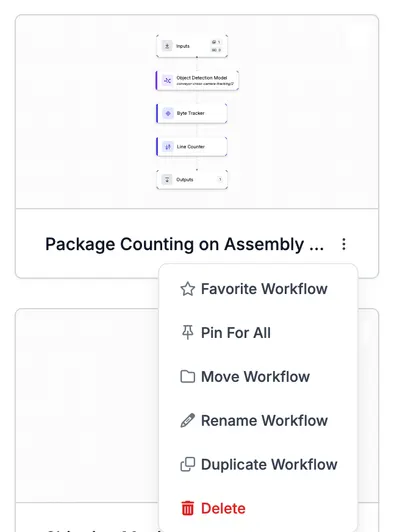
- Go to your Workflows dashboard and click the three dots next to the workflow you want to delete.
- Click "Delete".
- Type the workflow ID to confirm.
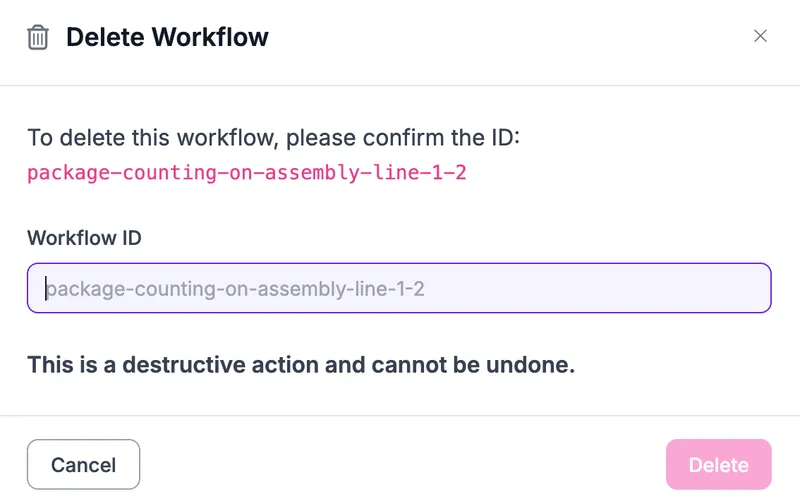
- Click "Delete".
Restore or permanently delete
See Trash for how to restore a deleted workflow or remove one immediately without waiting for the 30-day retention window.
Delete via API, SDK, or CLI
You can also move a workflow to Trash through:
- REST API:
DELETE /:workspace/workflows/:workflow - Python SDK:
rfapi.delete_workflow(api_key, workspace, workflow_url) - CLI:
roboflow workflow delete <workflow>
To restore outside the web app use workspace.restore_from_trash("workflow", workflow_id) from the SDK or roboflow workflow restore <workflow> from the CLI.