We support Meta's Segment Anything Model 2 inferencing via our Serverless Cloud API. SAM2 is a promptable visual segmentation model that accepts points and bounding boxes as prompts. We offer two SAM2 endpoints:
/sam2/embed_image, which generates and caches an image embedding/sam2/segment_image, which returns instance segmentation masks for the given prompts
SAM2 API
Run SAM2 through the HTTP endpoint directly with curl, or with the inference-sdk wrapper.
Get your API Key
Create a Roboflow account, find your key on the Roboflow API settings page and make it available to your shell:
export ROBOFLOW_API_KEY="your-key-here"Run the model
Call the /sam2/segment_image endpoint with curl:
curl --location 'https://serverless.roboflow.com/sam2/segment_image' \
  --header 'Content-Type: application/json' \
  --data '{
    "api_key": "'"$ROBOFLOW_API_KEY"'",
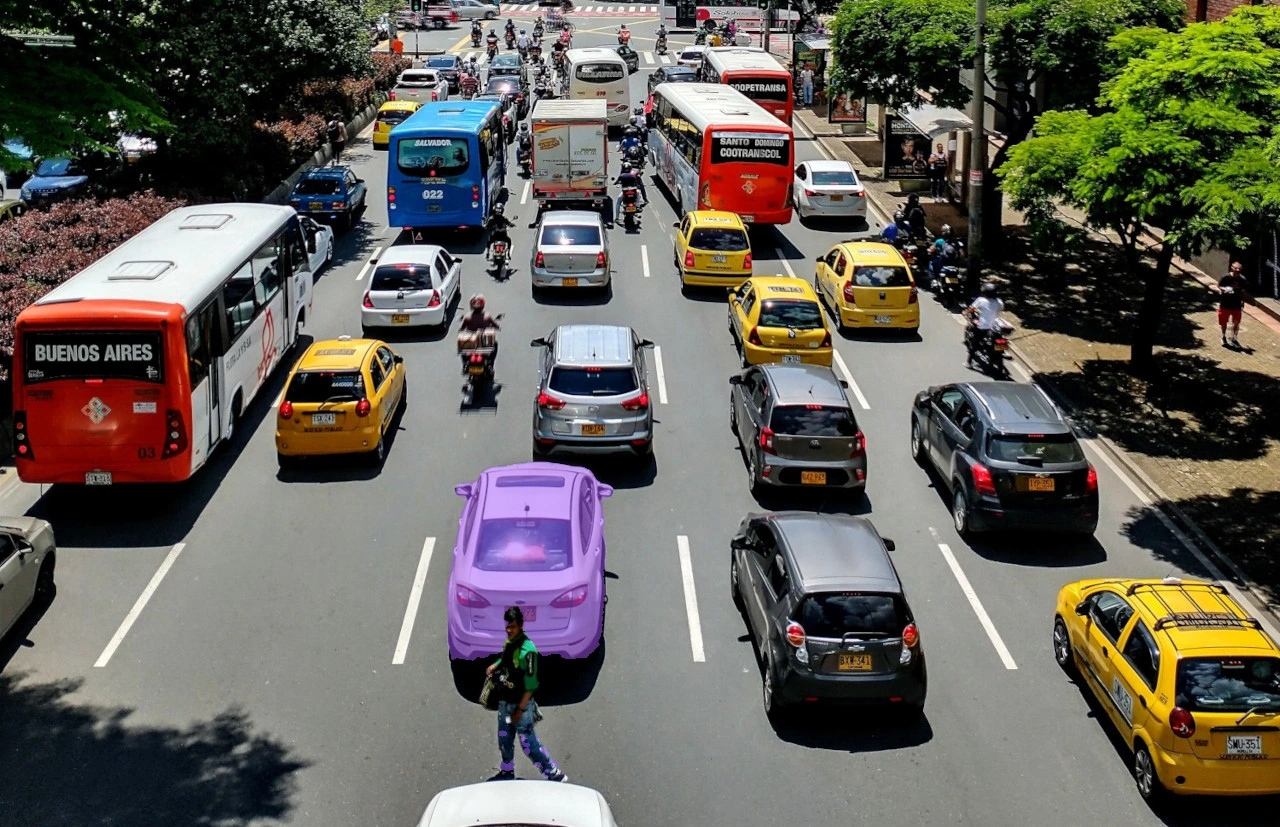
    "image": {"type": "url", "value": "https://media.roboflow.com/quickstart/traffic.jpg"},
    "prompts": {"prompts": [{"points": [{"x": 520, "y": 470, "positive": true}]}]},
    "sam2_version_id": "hiera_tiny"
}'Get your API Key
Create a Roboflow account, find your key on the Roboflow API settings page and make it available to your shell:
export ROBOFLOW_API_KEY="your-key-here"Install the dependencies
These packages call the model and draw its results:
pip install -U inference-sdk supervision opencv-pythonRun the model
Call the segmentation endpoint with a single positive point prompt, convert the returned polygons to detections with supervision, and save an annotated PNG with the mask drawn over the input image:
import os
import cv2
import supervision as sv
from inference_sdk import InferenceHTTPClient

image = sv.load_image_from_url("https://media.roboflow.com/quickstart/traffic.jpg")
height, width = image.shape[:2]

client = InferenceHTTPClient(
    api_url="https://serverless.roboflow.com",
    api_key=os.environ["ROBOFLOW_API_KEY"],
)

result = client.sam2_segment_image(
    inference_input=image,
    prompts=[
        {"points": [{"x": 520, "y": 470, "positive": True}]}
    ],
    sam2_version_id="hiera_tiny",
)

detections = sv.Detections.from_sam3(sam3_result=result, resolution_wh=(width, height))

annotated = sv.MaskAnnotator().annotate(image.copy(), detections)
cv2.imwrite("traffic_annotated.png", annotated)
sv.Detections.from_sam3 reads the polygon predictions that both SAM2 and SAM3 return, so the same call decodes either model's output.
SAM2 inference speed
Latency measured with Roboflow Inference on 1x NVIDIA L4, batch size 1, mean after warmup.
| Model | Latency (ms) |
|---|---|
sam2 | 177.7 |
Measured with segment_image on the hiera_large checkpoint. SAM2 caches image embeddings, so this figure uses a fresh image each call and reflects the full encode plus decode cost. Re-prompting an already-encoded image is substantially faster.
Set api_url to match your deployment target:
https://serverless.roboflow.comfor the Serverless Cloud API.http://localhost:9001for a local Inference server.- Your Dedicated Deployment URL for a private endpoint.
For additional usage details, including embedding caching and box prompts, see the Inference documentation.
Run SAM2 with self-hosted Inference
SAM2 can also be loaded directly with the inference package, or served from a GPU container you run yourself. This is the right path when you want to keep images on your own hardware, or when you are re-prompting the same image many times.
Run in Docker
Build the SAM2 image from the root of the inference repository:
docker build -f docker/dockerfiles/Dockerfile.sam2 -t sam2 .Then start a server that exposes the SAM2 endpoints:
docker run -it --rm -v /tmp/cache/:/tmp/cache/ --gpus=all --net=host sam2Point api_url at that server (http://localhost:9001) and the code samples above work unchanged.
SAM2 with flash attention has a known issue on some GPUs, including the L4 and A100. Apply the fix from that thread, or use the Docker image above, which already handles it.
Load the model in Python
import os

os.environ["API_KEY"] = "YOUR_API_KEY"

from inference.core.entities.requests.sam2 import Sam2PromptSet
from inference.core.utils.postprocess import masks2poly
from inference.models.sam2 import SegmentAnything2

model = SegmentAnything2(model_id="sam2/hiera_large")

image_path = "./hand.png"

# Precompute and cache the image embedding
embedding, img_shape, image_id = model.embed_image(image_path)

# Segment using the cached embedding
raw_masks, raw_low_res_masks = model.segment_image(image_path)
raw_masks = raw_masks >= model.predictor.mask_threshold
poly_masks = masks2poly(raw_masks)
Embeddings are cached automatically, so you can embed an image as soon as you know you will need it and re-prompt cheaply afterwards.
To refine a mask, send a negative point ("positive": False) to exclude a region:
prompt = Sam2PromptSet(
    prompts=[{"points": [{"x": 250, "y": 800, "positive": False}]}]
)

refined_masks, refined_low_res_masks = model.segment_image(image_path, prompts=prompt)
refined_masks = refined_masks >= model.predictor.mask_threshold
Available model_id values: sam2/hiera_tiny, sam2/hiera_small, sam2/hiera_b_plus, sam2/hiera_large.
SAM2 video tracking in Workflows
The SAM2 Video Tracker block (roboflow_core/segment_anything_2_video@v1) runs SAM2's streaming video predictor frame by frame, keeping per-video temporal memory so object identities persist across frames. Feed it bounding boxes from an upstream detector: it converts each box to a mask and tracks it on subsequent frames, emitting segmentation predictions whose tracker_id stays stable for as long as SAM2 follows the object. Masks inherit the class name, class id, and confidence of the detection that prompted them.
- Stateful and local-only. The block keeps one tracking session per
video_metadata.video_identifier, so it can multiplex many streams, but the session lives in process memory. It requiresWORKFLOWS_STEP_EXECUTION_MODE=local, a GPU, and a persistent WebRTC session. It is not suitable for separate stateless HTTP requests. - Prompt scheduling.
prompt_modecontrols when detector boxes are consumed as prompts:first_frame(default) prompts once per session then tracks silently;every_n_framesre-seeds everyprompt_intervalframes, picking up objects that entered the scene;every_framere-seeds on every frame, acting as a per-frame detection-to-mask adapter with stable tracker ids. - Model variants.
model_idselects the Hiera backbone:sam2video/tiny,sam2video/small(default),sam2video/base-plus,sam2video/large. The block also acceptssam3trackervideo, SAM3's visually prompted tracker, which uses the same box-prompt contract with a much larger backbone. It holds identities better on long videos and in crowded scenes at higher compute cost: treat it as the maximum-quality tier and thesam2videosizes as the speed tiers.
from inference_sdk import InferenceHTTPClient
from inference_sdk.webrtc import StreamConfig, VideoFileSource

WORKFLOW = {
    "version": "1.0",
    "inputs": [{"type": "InferenceImage", "name": "image"}],
    "steps": [
        {
            "type": "roboflow_core/roboflow_object_detection_model@v2",
            "name": "detector",
            "images": "$inputs.image",
            "model_id": "yolov8n-640",
        },
        {
            "type": "roboflow_core/segment_anything_2_video@v1",
            "name": "tracker",
            "images": "$inputs.image",
            "boxes": "$steps.detector.predictions",
            "prompt_mode": "every_n_frames",
            "prompt_interval": 30,
        },
    ],
    "outputs": [
        {
            "type": "JsonField",
            "name": "predictions",
            "selector": "$steps.tracker.predictions",
        }
    ],
}

client = InferenceHTTPClient(
    api_url="http://localhost:9001",
    api_key="YOUR_API_KEY",
)

session = client.webrtc.stream(
    source=VideoFileSource("path/to/video.mp4"),
    workflow=WORKFLOW,
    config=StreamConfig(data_output=["predictions"]),
)

@session.on_data("predictions")
def handle_predictions(predictions, metadata):
    print(predictions)

session.run()
For open-vocabulary video tracking from text prompts, with no upstream detector, see the SAM3 Video Tracker block on the SAM3 page.
Execution modes in Workflows
When used in an image Workflow, SAM2 runs in one of two modes:
- Local execution: the model runs on your Inference server (GPU strongly recommended).
- Remote execution: the model is invoked over HTTP on a remote Inference server through the
sam2_segment_image()client method.
See also
- SAM3 - segments every instance of a concept from a text prompt.
- Segment Anything (SAM) - the original single-object model.