YOLO11 object detection runs through the Serverless Cloud API, pretrained on COCO at 640 input size. For self-hosted deployment, see Roboflow Inference.
YOLO11 Object Detection API
This sample runs inference through the Serverless Cloud API, decodes the response with supervision, and writes an annotated image to disk.
Get your API Key
Create a Roboflow account, find your key on the Roboflow API settings page and make it available to your shell:
export ROBOFLOW_API_KEY="your-key-here"Install the dependencies
These two packages call the model and draw its results:
pip install -U inference-sdk supervisionRun the model
Run yolov11n-640 on a sample image and annotate boxes and labels:
import os
import cv2
import supervision as sv
from inference_sdk import InferenceHTTPClient

image_url = "https://media.roboflow.com/quickstart/traffic.jpg"
image = sv.load_image_from_url(image_url)

client = InferenceHTTPClient(
    api_url="https://serverless.roboflow.com",
    api_key=os.environ["ROBOFLOW_API_KEY"],
)

results = client.infer(image, model_id="yolov11n-640")
detections = sv.Detections.from_inference(results)

annotated = sv.BoxAnnotator().annotate(image.copy(), detections)
annotated = sv.LabelAnnotator().annotate(annotated, detections)

cv2.imwrite("traffic-annotated.png", annotated)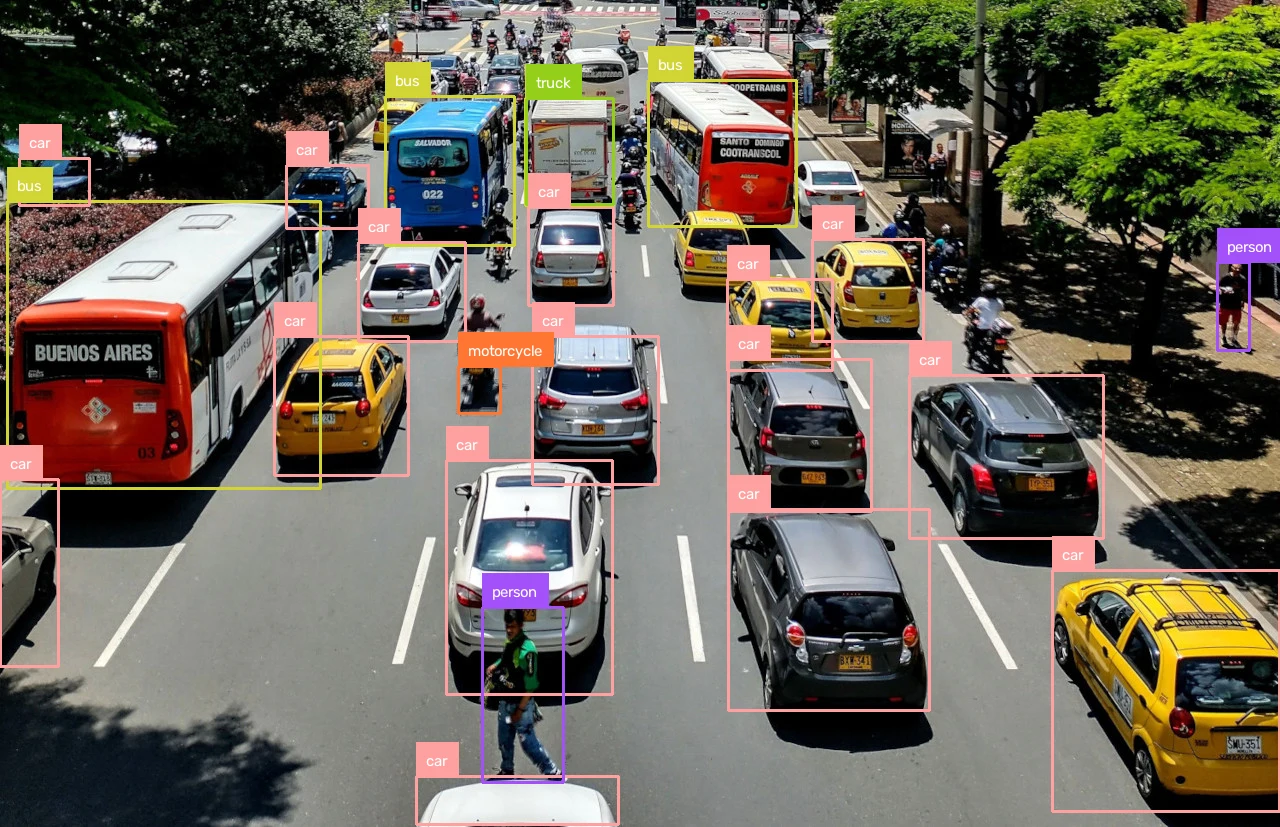
Set api_url to match your deployment target:
https://serverless.roboflow.comfor the Serverless Cloud API.http://localhost:9001for a local Inference server.- Your Dedicated Deployment URL for a private endpoint.
YOLO11 Object Detection models and benchmarks
Pass any of these aliases as the model_id. The inference-sdk resolves each alias to a pretrained Roboflow Universe model; the yolo11* prefix variants resolve to the same models.
| Alias | Input Size | mAP50-95 | ONNX latency (ms) | TensorRT FP16 (ms) |
|---|---|---|---|---|
yolov11n-640 | 640x640 | 39.5 | 3.4 | 2.2 |
yolov11s-640 | 640x640 | 47.0 | 4.5 | 2.5 |
yolov11m-640 | 640x640 | 51.5 | 8.3 | 3.5 |
yolov11l-640 | 640x640 | 53.4 | 10.7 | 4.3 |
yolov11x-640 | 640x640 | 54.7 | 18.8 | 7.1 |
YOLO11 Instance Segmentation
YOLO11 instance segmentation runs through the Serverless Cloud API, pretrained on COCO at 640 input size. For self-hosted deployment, see Roboflow Inference.
YOLO11 Instance Segmentation API
Set your API key and install the dependencies as shown above, then run yolov11n-seg-640 and annotate masks and labels:
import os
import cv2
import supervision as sv
from inference_sdk import InferenceHTTPClient

image_url = "https://media.roboflow.com/quickstart/traffic.jpg"
image = sv.load_image_from_url(image_url)

client = InferenceHTTPClient(
    api_url="https://serverless.roboflow.com",
    api_key=os.environ["ROBOFLOW_API_KEY"],
)

results = client.infer(image, model_id="yolov11n-seg-640")
detections = sv.Detections.from_inference(results)

annotated = sv.MaskAnnotator().annotate(image.copy(), detections)
annotated = sv.LabelAnnotator(text_position=sv.Position.CENTER_OF_MASS).annotate(annotated, detections)

cv2.imwrite("traffic-annotated.png", annotated)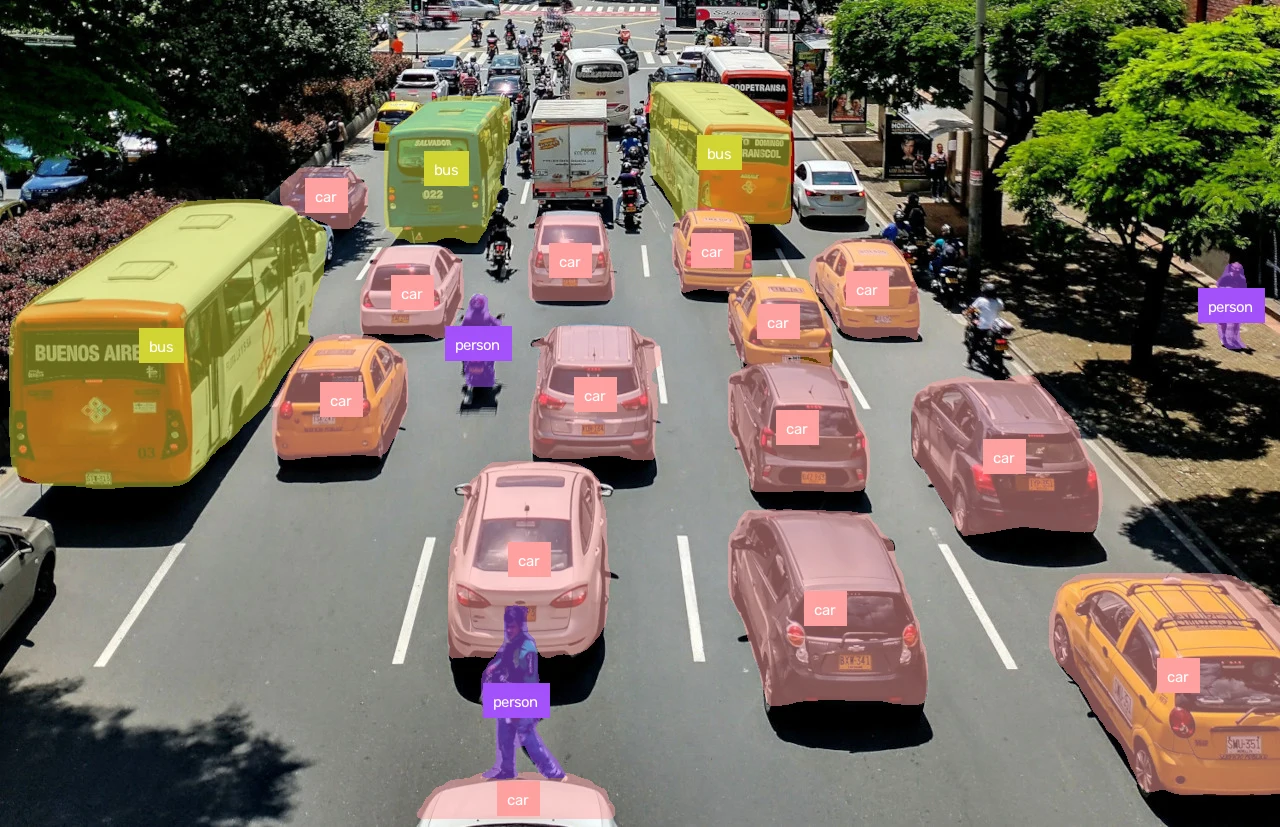
YOLO11 Instance Segmentation models and benchmarks
Pass any of these aliases as the model_id; the yolo11* prefix variants resolve to the same models.
| Alias | Input Size | Box mAP50-95 | Mask mAP50-95 | ONNX latency (ms) | TensorRT FP16 (ms) |
|---|---|---|---|---|---|
yolov11n-seg-640 | 640x640 | 38.9 | 32.0 | 7.3 | 5.7 |
yolov11s-seg-640 | 640x640 | 46.6 | 37.8 | 10.0 | 7.5 |
yolov11m-seg-640 | 640x640 | 51.5 | 41.5 | 14.5 | 9.1 |
yolov11l-seg-640 | 640x640 | 53.4 | 42.9 | 16.8 | 9.7 |
yolov11x-seg-640 | 640x640 | 54.7 | 43.8 | 27.5 | 13.1 |
* Latency is measured with Roboflow Inference on 1x NVIDIA L4, batch size 1, mean of 1,000 inferences (100 warmup). The default inference-gpu install runs ONNX on the CUDA execution provider; adding the inference-models[trt10] extra selects a prebuilt TensorRT FP16 engine automatically. FP16 matches FP32 accuracy within 0.1 mAP on COCO val2017. Accuracy is the published COCO val2017 spec (source).